Golf simulator lighting: what to use and where it goes
Updated
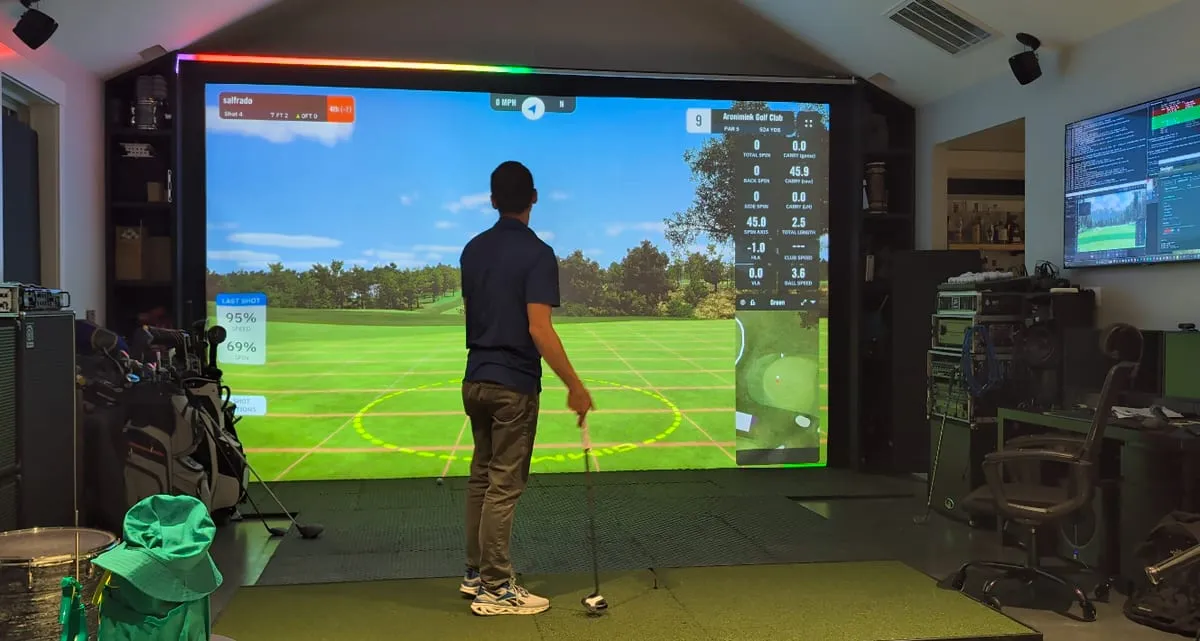
A golf sim wants two opposite things from your lights. The hitting area needs enough light to see the ball, read your clubs, and keep a camera-based launch monitor happy. The screen needs as little light as possible, because anything that lands on it washes out the picture. Everything else in the room should make the space feel finished without fighting either of those.
Here's how to set it up, one layer at a time.
The short version
- Light the mat from above with narrow-beam fixtures aimed down, not toward the screen.
- Keep the screen wall dark. Nothing mounted on it, nothing pointed at it.
- Put room lighting on its own switch or dimmer so you can drop it while you play.
- If your launch monitor uses cameras, check what it needs before buying fixtures, then test with every light on.
- LED strips go a few feet back from the screen, inside a diffuser channel, facing down or across the room.
Why is lighting a golf simulator tricky?
A projector can't project black. The darkest thing on your screen is whatever light is already hitting it, so every lamp that spills onto the screen lowers contrast and fades the course. That's why so many sims end up too dark at the mat or too washed out at the screen.
Screen size makes it harder. A sim screen is usually a lot bigger than a home theater screen, so the projector's output is spread thinner and room light wins faster.
The fix is to think in zones: a bright pool of light on the mat, a dark zone in front of the screen, and soft light everywhere else.
Where should lights go in a golf simulator?
- Screen: keep it dark
- LED strip in a diffuser, a few feet back, facing down
- Narrow-beam spots aimed down at the mat
- Soft room light on its own switch
Over the hitting area
Mount fixtures on the ceiling above the mat, or slightly behind it toward the back of the room, and aim them straight down. If a fixture has to be angled, angle it away from the screen.
Narrow beams are what make this work. Track heads, PAR spots, and adjustable pinspots put a pool of light on the mat without spreading it forward. Two fixtures from different sides cut down the shadow your body throws across the ball.
Give the hitting-area lights their own dimmer.
Around the room
Keep it soft and indirect: wall washers, sconces, or LED strips aimed at the side and back walls. It should be low enough to leave on while you play, and on a separate switch from the hitting-area lights.
Where not to put lights
- On the screen wall or the enclosure frame around the screen
- In front of the hitting area, aimed toward the screen
- In your line of sight when you look down the target line
- Near white or glossy walls beside the screen, which bounce light back onto it
What kind of lights work best?
For the hitting area: dimmable LED track lighting, PAR30 or PAR38 LED spots, or pinspots. Choose spot beam angles over floods. Floods spill everywhere.
For the rest of the room: anything soft and dimmable. LED strips in diffuser channels work well here (more on those below).
Two specs matter more than people expect.
Flicker. Cheap LED drivers and mismatched dimmers flicker. You may not notice it, but high-speed cameras will, both launch monitor cameras and swing cameras. Buy fixtures sold as flicker-free and dimmers rated for them.
Color. Pick one color temperature for your white lights and stick with it. Mixed whites look off in person and worse on video. Around 3000K feels like a room; 5000K feels like a garage. High-CRI bulbs make turf, clubs, and swing video look natural.
Does lighting affect launch monitor readings?
It depends on how your monitor sees the ball.
Camera-based monitors are the sensitive ones. Overhead units like Uneekor's want a lot of steady, flicker-free light over the hitting area. Floor-based camera units vary by model, so check the install guide.
Radar-based monitors care much less about room light for ball data, but several now pair radar with a camera. Read your manual.
Whatever you use, finish the lighting first, then calibrate and test the monitor with every light on the way you'll actually play. If the numbers change when you flip a light on, that light is the problem.
LED strip lighting for a golf simulator
LED strips are the quickest way to make a sim bay look finished. Done wrong, they're also the quickest way to make it look cheap. A few things make the difference.
Placement
Mount them a few feet back from the screen. Ceiling strips facing down and side-wall strips facing each other light the bay without touching the screen. Strips on the screen frame or the front of the enclosure spill straight onto it.
A strip along the edge of the hitting mat lights the floor around you, and a strip on the back of a scoreboard TV makes easy bias lighting.
Use a diffuser channel
Bare strips show every LED as a dot, and the dots reflect off everything. An aluminum channel with a frosted lens turns the strip into a clean line of light and gives you something solid to mount. For the mat, low-profile channels with a flange that slides under the turf edge work well.
Pick the right kind of strip
- Single-color and basic RGB strips change the whole run at once. Fine for a static glow.
- COB strips look smooth with no dots, but many can only show one color along the whole run.
- Addressable strips (WS2815, SK6812 and similar) control each LED or small group on its own. You need these for anything that moves: chases, meters, or effects that react to the game.
Flicker and swing cameras
Strips dim by switching on and off very fast (PWM). If that switching is slow, a high-speed swing camera catches it as banding or strobing. Lights running off AC can also flicker at the mains frequency. The fix is strips with a very high PWM frequency, powered by a 12V DC supply. That's what SimLight's recommended hardware uses, and it doesn't show up on high-speed swing video.
Plan power for long runs
Voltage drops along a strip, so on a long run the far end gets dimmer or shifts color. 12V and 24V strips handle long runs better than 5V. On long runs, feed power at both ends (power injection), size the power supply for the full length with headroom, and use heavier wire for long power runs.
Controllers
For addressable strips, WLED on an ESP32 controller (Gledopto makes popular ones) is the go-to. It's inexpensive, open, and other software can drive it. Most app-only strip kits (Govee and similar) are closed systems that SimLight can't drive.
Not sure what to buy? The parts list builder picks strips, channels, power supplies, and a controller for your bay.
Lighting that reacts to the game
Once you have addressable strips on a WLED controller, they don't have to sit there glowing one color. That's why we built SimLight. It connects to GSPro and drives your strips with every shot: the lights change when the ball is ready, the bay reacts at impact, and the color settles on where the ball finished, whether that's fairway, rough, sand, the green, water, or out of bounds. Side strips can show your current lie, and a strip along the mat can track your score to par through the round.
It runs on the same hardware this guide recommends, so if you've built the strips, you're most of the way there.
FAQ
Should a golf simulator room be dark?
Dark at the screen, lit at the mat. A fully dark room makes the picture pop, but you can't see your ball or clubs, and camera-based monitors need light. Go for a bright pool on the mat and dim light everywhere else.
Can I put LED strips around my golf simulator screen?
Not on the screen frame. Strips that close spill onto the screen and wash it out. Move them a few feet into the room and face them away from the screen.
Do LED strips flicker on swing camera video?
They can. Strips with low-frequency PWM, or lights running off AC, show up as banding or strobing on high-speed video. The strips SimLight recommends use very high-frequency PWM on a 12V DC supply, so they don't.
Will LED strips mess with my launch monitor?
Strips mounted away from the hitting area inside a diffuser are dim compared to your hitting-area lights and usually aren't a problem. If you use a camera-based monitor, test with them on before you trust the numbers.
How do I make my golf sim lights react to shots?
You need addressable LED strips, a WLED controller, and software that knows what's happening in the sim. SimLight does that for GSPro.